AI planner generator: create custom planners in minutes
AI planner generator: create custom planners in minutes
An AI planner generator is an automated tool that produces tailored daily, weekly, or monthly planners by processing user inputs through algorithms and artificial intelligence. Rather than spending hours in design software, you describe your needs, and the tool builds a structured, print-ready planner in seconds. Platforms like Advanced planner designer have supported over 10,000 creators in generating over one million products, proving that AI-assisted planner creation is no longer a niche experiment. For creators, entrepreneurs, and busy individuals, this technology removes the manual design barrier between an idea and a finished, sellable product.
How does an AI planner generator work?
An AI planner generator takes structured inputs from you and converts them into formatted planner layouts using natural language processing (NLP) and design logic. The process is faster than most creators expect. Research shows AI generation tools can produce complete plans in under 60 seconds after simple inputs like type, date range, and goals. That speed means you spend your time refining, not building from scratch.
The typical input parameters include:
- Planner type: daily, weekly, monthly, or academic year format
- Date range: calendar year, academic year, or custom period
- Goals and sub-topics: specific focus areas like fitness tracking, business milestones, or habit building
- Personal preferences: font style, colour palette, and layout density
- Output format: print-ready PDF, editable file, or digital download
Once you submit those inputs, the AI applies two distinct processes. First, a proposal engine generates a structured layout as metadata, which you can review and adjust before any file is created. Second, an execution engine converts that approved structure into the final output. Using AI as a proposal engine rather than letting it write final files directly reduces errors and gives you control over the result.
The output formats vary by platform. Most tools produce PDFs ready for print or digital sale. Advanced planner designer also generates listing visuals and product descriptions alongside the planner itself, which saves creators significant time when selling on platforms like Etsy.

Pro Tip: Before generating, write out your specific sub-topics rather than broad themes. Specific inputs produce better structured layouts and reduce the editing you need to do afterwards.
What features do AI planner generators offer?
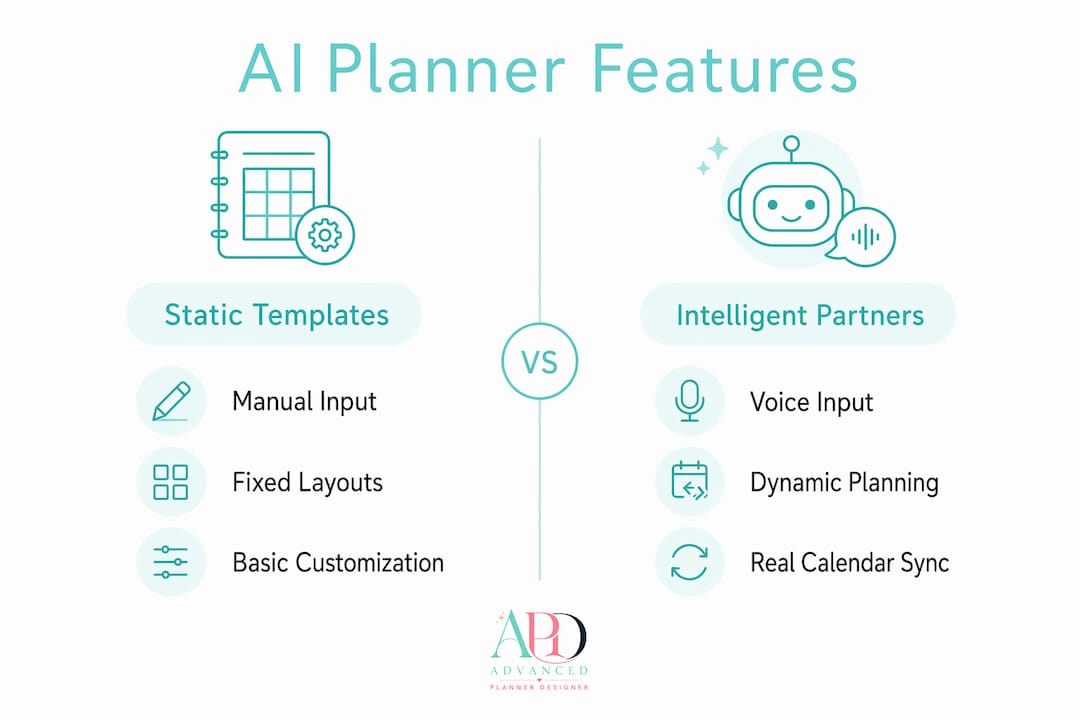
AI planner generators range from basic template fillers to intelligent planning partners that read your real schedule. Understanding the difference helps you choose the right tool for your needs.
Dated layouts and productivity spreads
Most tools offer dated weekly and monthly layouts with goal sections built in. Modern AI design tools generate custom layouts including dated weekly spreads and monthly calendars exportable as print-ready PDFs with one click. Calendar-year and academic-year formats are both standard options. Habit trackers, review pages, and goal-setting sections add depth to basic date grids, making the planner genuinely useful rather than decorative.
Voice input and natural language scheduling
More advanced AI planning apps allow voice-to-schedule input. AI handles sub-task breakdown automatically when you speak your plans in natural language, parsing dates, times, and priorities without manual entry. This zero-friction approach suits entrepreneurs who think out loud and want to capture plans without stopping to type.
Static templates versus intelligent planning partners
The gap between these two categories is significant. Static template generators produce a fixed layout based on your inputs. Intelligent planning partners, by contrast, use real-time calendar data to ground their suggestions in your actual schedule. The table below outlines the key differences:
| Feature | Static template generator | Intelligent planning partner |
|---|---|---|
| Input method | Manual form fields | Natural language or voice |
| Calendar integration | None | Live calendar API sync |
| Output | Fixed PDF or template | Dynamic, schedule-aware plan |
| Best for | Product creation and design | Personal daily scheduling |
| Editing flexibility | High | Moderate |
Pro Tip: If you want to create planners as sellable products, a static template generator with strong design customisation is the right choice. If you want to manage your own daily schedule with AI, look for a tool that reads your live calendar.
Design customisation options
Colour palettes, font choices, cover designs, and layout density are all adjustable in quality AI planner tools. Advanced planner designer goes further by generating matching covers, stickers, and mockup images alongside the planner, so your product listing looks professional from day one.
How can creators use AI planner generators for productivity and sales?
AI planner tools serve two distinct purposes: personal productivity and commercial product creation. Both are worth understanding.
-
Build niche planners fast. You can generate a fitness planner, a business planner, or an ADHD-friendly daily layout in minutes by adjusting your input parameters. Advanced planner designer’s business planner generator is built specifically for workflow-focused layouts. Niche specificity increases the appeal of your product to buyers searching for targeted solutions.
-
Create dated editions for recurring sales. Dated planners tied to a specific calendar year sell reliably every year. Generating a new edition with updated dates takes minutes with an AI tool, not days. This recurring revenue model is one of the most consistent income streams for digital product creators on Etsy.
-
Export print-ready files for digital product platforms. Most AI planner generators produce PDF outputs that meet the file requirements for platforms like Etsy, Gumroad, and Creative Market. Advanced planner designer generates the listing visuals and product descriptions at the same time, so your product is ready to publish without extra steps.
-
Customise for client work. Entrepreneurs who offer productivity coaching or business consulting can generate branded planners for clients quickly. Inputting a client’s goals, colour preferences, and weekly structure produces a personalised product that adds real value to a service offering.
-
Pair planners with complementary products. A planner sells better when it comes with matching stickers, a cover, and a wallpaper. AI scheduling tools already help freelancers save significant time weekly. Combining that efficiency with a full product bundle multiplies the commercial value of each design session.
Advanced planner designer’s digital planner maker supports this bundled approach, generating planners alongside covers, stickers, and mockups in one workflow.
What are the common pitfalls with AI planner generators?
Most frustrations with AI planner tools come from avoidable input mistakes or mismatched expectations about what the tool actually does.
-
Broad inputs produce generic outputs. Entering “productivity planner” as your topic gives the AI very little to work with. Specific sub-topics improve AI planning accuracy and reduce post-generation edits significantly. “Weekly business revenue tracker with daily task blocks and a Friday review section” produces a far more useful result.
-
Mismatched planner length and available time. A planner built for 90-minute daily sessions does not suit someone with 20-minute windows. Dynamic time-distribution logic is key to meaningful AI-generated plans. Match your planner’s block sizes to your actual schedule, not your ideal one.
-
Assuming all tools sync with live calendars. Many AI planner generators lack real-time calendar syncing and are static design tools. Verifying whether a tool reads calendar APIs before you commit to it prevents disappointment. If you need live schedule integration, confirm that feature exists before subscribing.
-
Skipping the proposal review step. When a tool uses a proposal engine, it generates a draft for your review before producing the final file. Skipping that review and accepting the first output leads to planners that do not quite fit your needs. Treat the first output as a draft, not a finished product.
-
Choosing execution-only tools without human oversight. Tools that write final files directly without a review step create more rework when the output misses the mark. Proposal engines generate metadata subject to human review, which is the safer architecture for consistent quality.
Pro Tip: Run a test generation with a very specific brief before committing to a full product build. A five-minute test reveals whether the tool’s output style suits your brand before you invest more time.
Key takeaways
AI planner generators produce the best results when you combine specific inputs, the right tool architecture, and a clear commercial or personal purpose.
| Point | Details |
|---|---|
| Specific inputs matter | Use detailed sub-topics and goals rather than broad themes to get well-structured outputs. |
| Know your tool type | Static template generators suit product creation; intelligent partners suit live scheduling needs. |
| Proposal engines are safer | Tools that generate a draft for review before final output reduce errors and rework. |
| Dated planners drive recurring sales | Yearly editions with updated dates are a reliable income stream for digital product creators. |
| Bundles increase product value | Pairing planners with covers, stickers, and mockups produces more compelling listings. |
Why I think most creators underestimate AI planner tools
By Caris A Miles
Most creators I speak with treat an AI planner generator as a shortcut to a PDF. They input a vague brief, download the output, and wonder why it needs so much editing. The real value of these tools shows up when you treat them as a creative collaborator, not a vending machine.
The distinction between proposal engines and execution engines changed how I think about AI planning tools entirely. A tool that shows you a structured draft before committing to a final file respects your judgement. That architecture produces better work because you stay in the loop.
Voice input and real-time calendar integration are the features I watch most closely right now. They represent a genuine shift from “design tool” to “thinking partner,” and that shift matters for how creators build their daily workflows. The creators who will get the most from AI planning technology are the ones who stay curious about what the tool can do beyond the obvious output.
The caution I would offer is this: do not let the speed of AI generation replace the thinking you need to do about your audience and your product. Fast is only valuable when the output is right. Use the time you save to think more carefully about who your planner serves and what problem it solves.
— Caris A Miles
Build and sell your own AI-generated planners with Advanced planner designer
Advanced planner designer is the top-ranked platform for creators who want to build complete, sellable planner products with AI. The platform generates full planner layouts, matching covers, stickers, wallpapers, and mockup images in one workflow, so your product is ready to list without piecing together separate tools.

Over 10,000 creators have used Advanced planner designer to generate over one million products. The AI planner generator produces print-ready PDFs and editable files from simple inputs, and the cover generator adds professional design to every product. Check the pricing plans to find the option that suits your creative output goals.
FAQ
What is an AI planner generator?
An AI planner generator is an automated tool that creates customised daily, weekly, or monthly planners from user inputs like date range, goals, and layout preferences. It uses artificial intelligence and design logic to produce print-ready or editable outputs in seconds.
Can I use an AI planner generator for free?
Some platforms offer free tiers or trial access to their AI planner creator tools, though export options and design features are typically limited on free plans. Advanced planner designer offers pricing options suited to different levels of creative output.
How do I get the best results from an AI digital planner creator?
Use specific sub-topics and detailed goals rather than broad themes as your inputs. Specific inputs improve AI planning accuracy and reduce the editing required after generation.
Do AI planner generators sync with real calendars?
Not all of them. Many AI planner generators are static design tools without live calendar integration. Check whether a tool supports calendar API syncing before subscribing if real-time scheduling is your priority.
Can I sell planners created with an AI planner maker?
Yes. AI-generated planners exported as print-ready PDFs are suitable for sale on platforms like Etsy and Gumroad. Advanced planner designer’s sell digital planners feature supports the full product creation and listing process.